
Forgetting an account removes it from your NUFI interface. It doesn't delete the account or touch its funds: everything stays on the blockchain, and you can add the account back at any time.
Steps
- Open NUFI and log in with your wallet password.
- Find the account you want to remove in the left-hand panel
- To find it faster, click a chain's logo under Blockchains to filter the list, or use the Accounts search box.
- Next to the account's name, click the 3-dot menu, then Forget account:
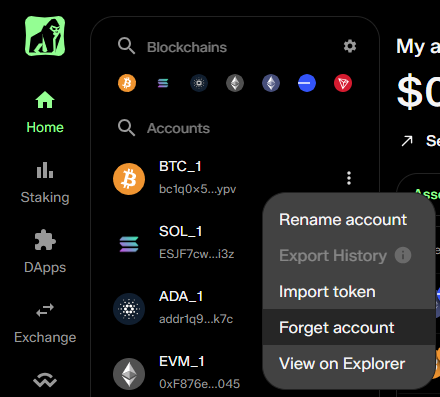
- Confirm. The account disappears from your accounts list.
Restoring a forgotten account
- Hot wallet accounts: click + Add account → Add new account, choose the blockchain, and select the account from the list. Forgotten accounts appear there alongside new ones.
- Hardware wallet accounts: click + Add account → Add new HW account and pair the account from your device again.