
Starting from December 10th 2025, you can redeem the $NIGHT tokens you earned during Midnight Network's Glacier Drop and Scavenger Mine in NUFI wallet's interface. This feature is available in NUFI's web wallet (https://wallet.nu.fi) and in NUFI's browser extension wallet version 30.0.25 and later.
Redeeming $NIGHT through NUFI is quick and easy: you can see your $NIGHT allocations, thaw schedule, and redeem tokens for all your accounts and addresses on one screen.
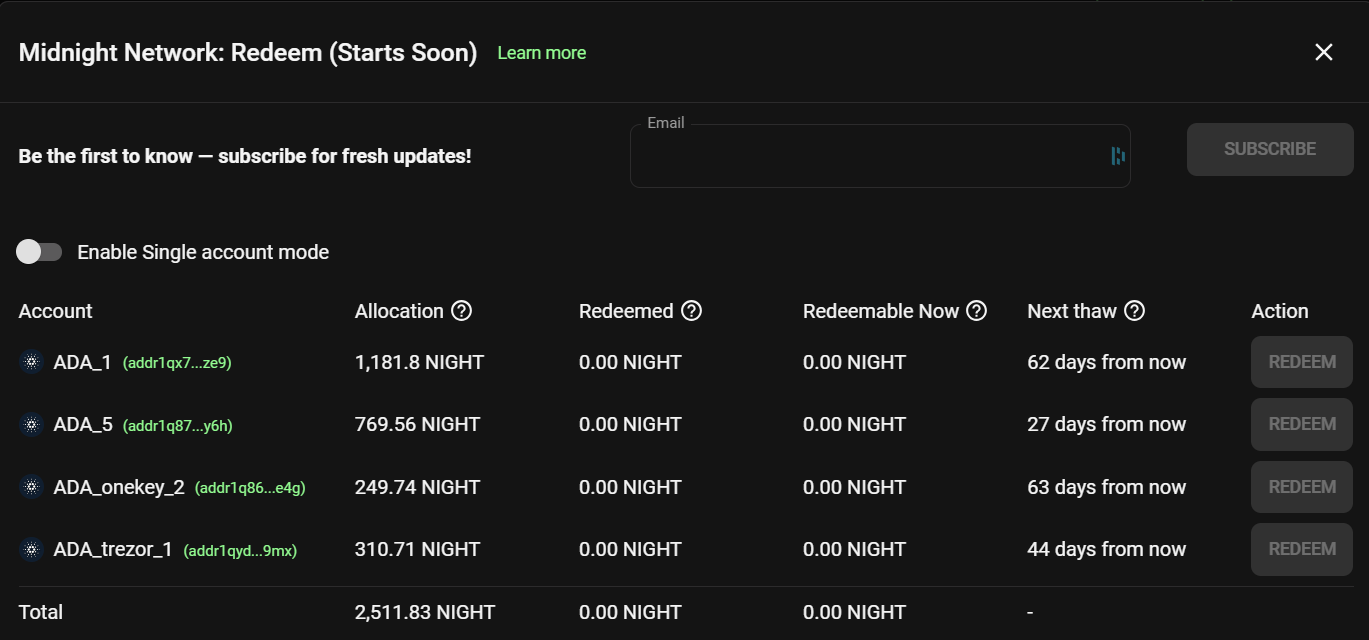
TABLE OF CONTENTS
What is the Redemption Period?
The Redemption Period is when the $NIGHT tokens you claimed during Glacier Drop or mined during Scavenger Mine become available to transfer into your wallet.
Each token allocation is redeemable in 4 equal installments (known as 'thaws'), and each address has a different thaw schedule. Your first thaw becomes available to redeem between December 10th 2025 and early March 2026, and subsequent thaws become redeemable every 90 days thereafter. When you redeem $NIGHT, you interact with a smart contract which deposits the tokens directly into your wallet; this is an on-chain transaction which requires a transaction fee to be paid.
Setup
To redeem $NIGHT in NUFI's interface, first add your destination Cardano account into a NUFI wallet profile. This is the account you selected to receive your $NIGHT tokens during Glacier Drop, or the account you mined with/donated to in Scavenger Mine.
To restore your accounts:
- download NUFI's browser extension wallet here or open NUFI's web wallet here
- restore your account(s) using a seed phrase or by pairing a hardware wallet (Ledger, Trezor, Keystone and OneKey devices supported)
- to restore multiple accounts with different seed phrases, first restore using one seed phrase and - after a NUFI wallet has been created - log out, choose to Restore again, and enter the next seed phrase to create another wallet profile. Repeat as necessary.
How to redeem $NIGHT tokens
Requirement: enough ADA to pay a transaction fee (approx. 0.2 ADA)
- Click Airdrop > Midnight Network: you'll see your Cardano accounts with $NIGHT allocations.
Important: if you mined $NIGHT using multiple accounts, make sure Single Account mode is disabled in order to see $NIGHT allocations for individual accounts. The $NIGHT allocation displayed in multi-account view does not include $NIGHT earned by an account's sub-addresses (to see these, enable Single Account mode and select an account).
Next to an address, you'll see its total $NIGHT allocation, how many tokens you've redeemed so far, how many tokens you can redeem right now, and when the next installment (aka 'thaw') can be redeemed. Hovering over the 'next thaw' information shows you how much $NIGHT will be available to redeem in the next thaw. - If you have $NIGHT that's thawed and available to redeem, click Redeem and sign the transaction to complete the withdrawal; this is an on-chain transaction and requires a transaction fee.
- The redeemed $NIGHT tokens will appear in your Cardano account as soon as the transaction has been processed by the network. You may need to refresh your wallet for the tokens to become visible.
FAQs
Q: How long do I have to redeem my $NIGHT tokens?
A: All thawing will be complete by November 29th 2026, and redeeming is possible until February 27th 2027. You can redeem your tokens at any time before then.
Q: Why is my account's $NIGHT allocation less than expected?
A: The allocation shown next to an account in multi-account view does not include $NIGHT earned by an account's sub-addresses. If you mined using an account's sub-addresses (using Single Account Mode), please enable Single Account Mode and select an account to see all of its allocations. Alternatively, you may have donated an address's $NIGHT to another address, which is why the $NIGHT it mined isn't displayed.
Q: I donated from one address to another, but it didn't seem to work; why?
A: In some rare cases, donating (i.e. reassigning redeem rights) may have been affected by problems with Midnight's API (which was intermittent or otherwise unavailable at different times during Scavenger Mine).
Q: I restored my accounts but not all have been added; why?
A: NUFI wallet may not have restored all of the Cardano accounts associated with a seed phrase or hardware wallet; to double check, go to Portfolio > Accounts screen and click 'Add Account' in the top-right. Select 'Add new account' (for seed phrase accounts) or 'Add new HW account' (for hardware wallet users), then select Cardano. You'll see which accounts are available to be added.